
Compile Error in Hidden Module: frmGetRange
Also applies to: frmCapabilityScorecard, frmDistFit, frmGetEmpirical, frmGetRangeCC, frmGetRangeHT, frmStackColumns, frmUnStackColumns, frmXXX, modXXX
When using any tool in Quantum XL, SPC XL, or DOE Pro that uses Excel's refEdit control, the user receives an error starting with "Compile error in hidden module: frmGetRange".
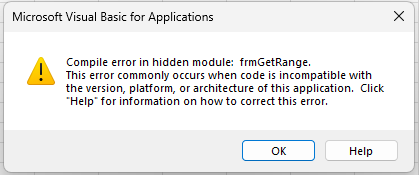
Solution — Switch to "Prompt me" ActiveX Settings
Please consult your IT department before making these changes.
- From Excel, select File then Options (Options is in the lower left corner).
- Click the Trust Center Settings button.
- Select ActiveX Settings.
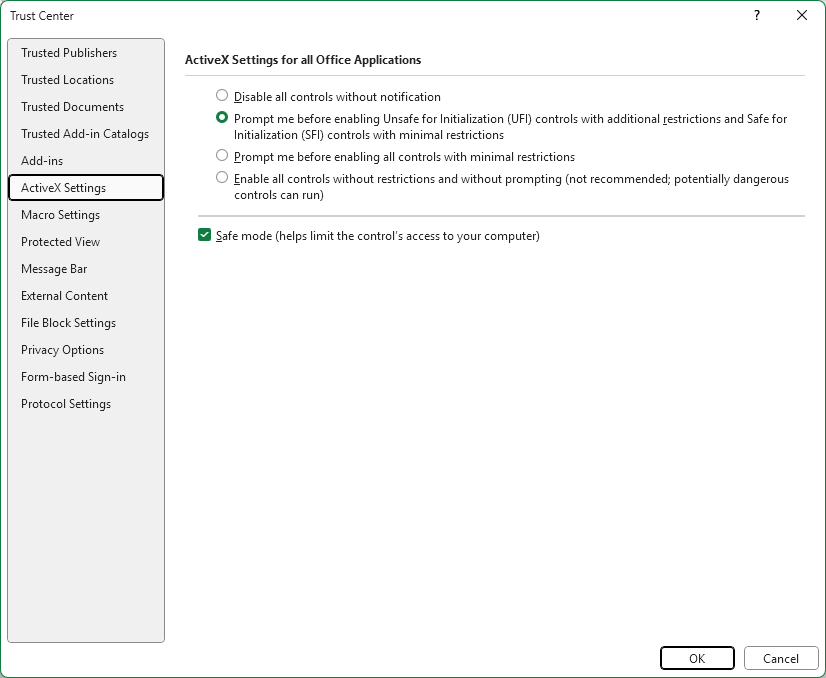
- Select "Prompt me before enabling Unsafe for Initialization (UFI) controls with additional restrictions and Safe For Initialization (SFI) controls with minimal restrictions" (preferred) OR if that doesn't work, select "Prompt me before enabling all controls with minimal restrictions".
- Close and re-open Excel.
View screenshot ▼
Alternative Solution #2
Please consult your IT department before making these changes.
- Most users have reported that the above solution, which leaves "Safe Mode" checked, works for them.
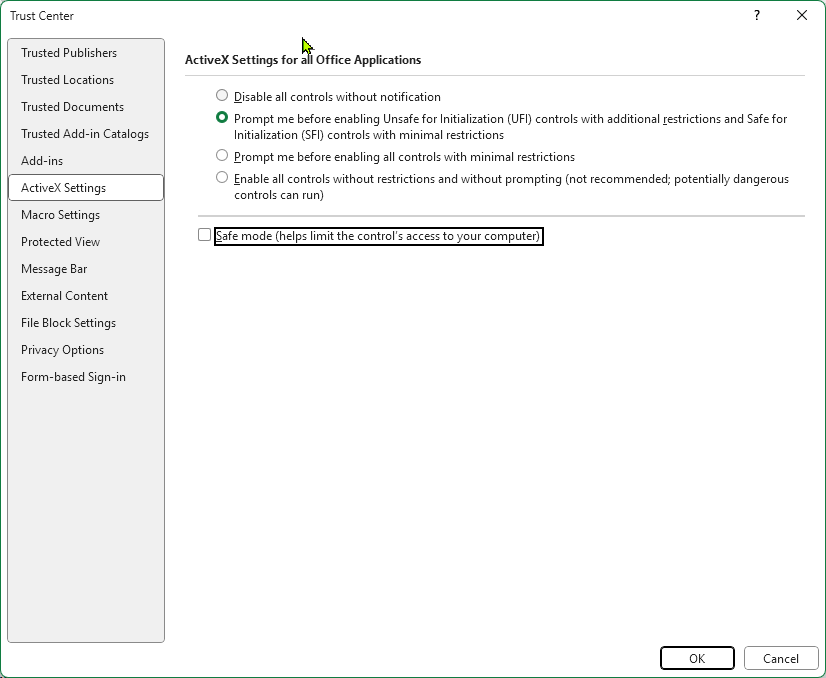
- Some users have reported that they must uncheck Safe Mode. See discussion below for more information.
View screenshot ▼
Alternative Solution #3 — Quantum XL — Windows Defender ASR Rules
Quantum XL requires read/write access to the Windows Registry and the ability to create child processes (DLLs). For most users this is not a problem. However, IT departments who implement the following Attack Surface Reduction (ASR) rules will not be able to run Quantum XL.
- Rule
{D4F940AB-401B-4EFC-AADC-AD5F3C50688A}— "Block all Office applications from creating child processes" - Rule
{92E97FA1-2EDF-4476-BDD6-9DD0B4DDDC7B}— "Block Win32 API calls from Office macros"
Depending on the configuration of the user's PC, a variety of errors can occur. Other security applications have similar settings under different titles.
Solution
- Exclude the installation folder:
"%Program Files(x86)%"\SigmaZone\Quantum XL(typicallyC:\Program Files (x86)\SigmaZone\Quantum XL). This is typically done through PowerShell with the command below, but contact your IT staff for assistance.Add-MpPreference -AttackSurfaceReductionOnlyExclusions 'C:\Program Files (x86)\SigmaZone\Quantum XL' - Or … Exclude all of the
.xlamfiles in"%Program Files(x86)%"\SigmaZone\Quantum XL.
Resources
Discussion
- Quantum XL, SPC XL, and DOE Pro XL all use the refEdit control which is part of Office. (Resource)
- Microsoft Announced in April 2025 that the default for Office ActiveX Security is changing to "Disable all controls without notification" from the previous default which was "Prompt me before enabling all controls with minimal restrictions". (Resource)
- Unfortunately, Microsoft's RefEdit control is an ActiveX control and therefore when Microsoft increased the security they disabled their own control in the process. The other UserForm controls (label, text box, combo box, …) are also ActiveX controls but are in FM20.dll whereas the RefEdit control is in RefEdit.dll. The setting "Disable All Controls Without Notification" is currently not affecting the controls in FM20.dll where the RefEdit control is. It is unclear at this time if the exclusion of the FM20.dll controls is a mistake or the inclusion of the RefEdit control is.
- The presentation of the error "Compile Error" is misleading and confusing. When you have "Disable all controls without notification" enabled, the refEdit controls are all removed from the UserForms causing a syntax error to any code that references the refEdit control. Thus, the error "Compile Error". (Resource)
- The behavior of Excel is erratic and seems to change between versions of Excel even within the same company. Many of our users have no problem running Quantum XL with "Disable all controls without notification" selected. Additionally, even with the setting at "Prompt me" many users report not having any prompt but Quantum XL still functions normally. In theory, unchecking "Safe Mode" shouldn't resolve the error but we've had reports from several users that indicate that it does.
- Windows Defender ASR rules can also cause the same behavior if enabled. Results again are erratic. (Resource)
- Our testing indicates that adding the macros as a trusted document or location does not help with this problem.